External Connectivity with eBGP in NDFC
About This Document
Section titled “About This Document”This document serves as a guide for configuring Data Center VXLAN EVPN fabric types in Nexus Dashboard Fabric Controller (NDFC) to use external connectivity via eBGP.
Prerequisites
Section titled “Prerequisites”- NDFC Fabric running Data Center VXLAN EVPN
- [[Basics of VXLAN EVPN in NDFC]]
- CML or EVE-NG topology from ^ but with a Catalyst 8000v connected to the borders.
This guide uses version Nexus Dashboard 3.2(2m) and the latest NDFC version.
This guide is meant for use after reading the following:
- [[Installing ND v3.2.x on ESXI]]
- [[Getting Started with NDFC]]
- [[Basics of VXLAN EVPN in NDFC]] This guide will breeze over some common topics like how to Recalculate and Deploy.
Instructions will be indicated bellow the associated screenshot.
Environment
Section titled “Environment”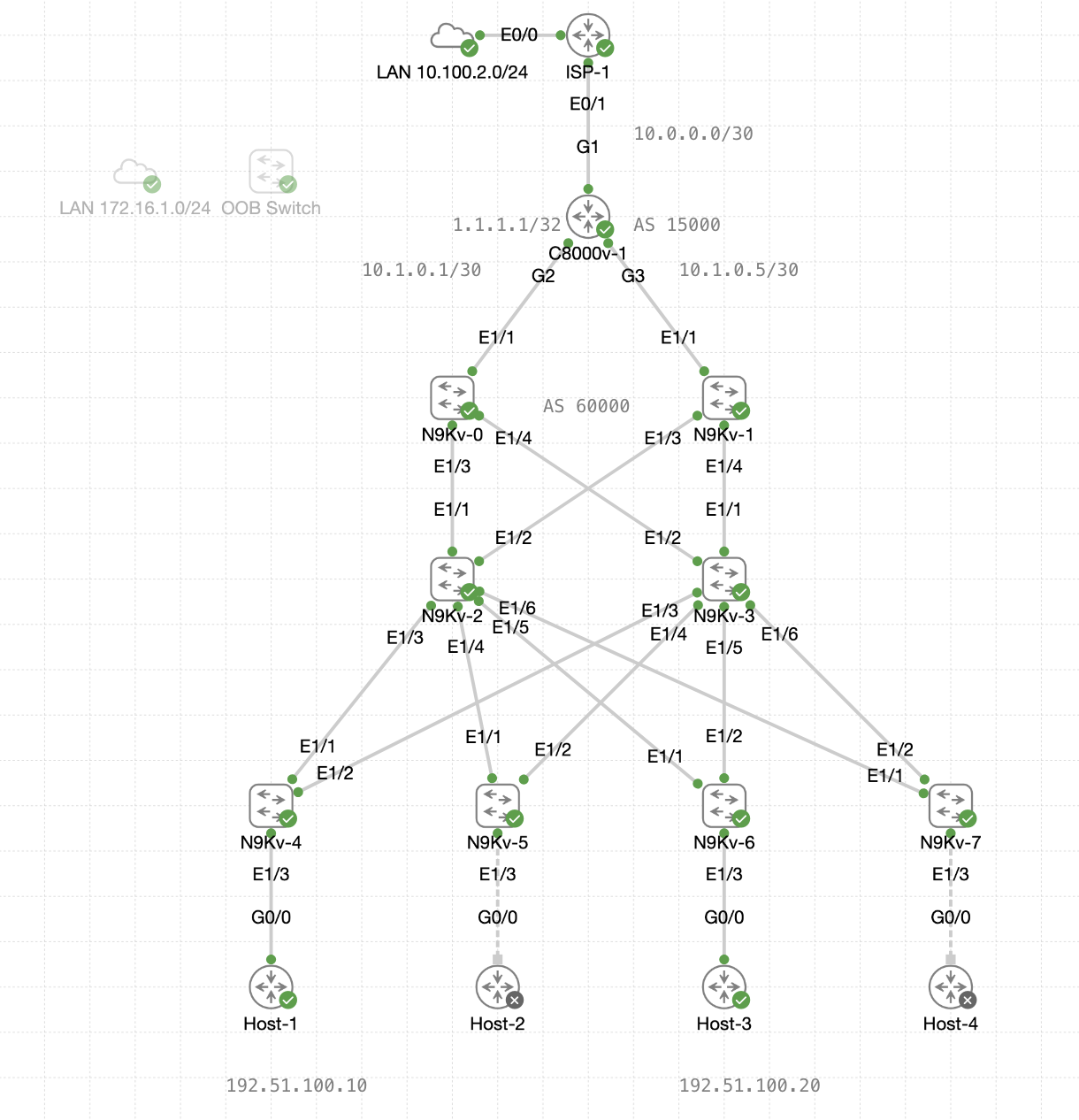
This guide will use the hosts from [[Basics of VXLAN EVPN in NDFC]], which are IOSv routers connected to interfaces Ethernet1/3 on all leafs.
- Host-1 <> N9Kv-4 (VLAN 10)
- Host-2 <> N9Kv-5 (VLAN 20)
- Host-3 <> N9Kv-6 (VLAN 10)
- Host-4 <> N9Kv-7 (VLAN 20)
- “Crossing Boundaries” (VLAN 10) - 192.51.100.0/24
- “Integrated Experiences” (VLAN 20) - 203.0.113.0/24
Upstream
Section titled “Upstream”For the Catalyst 8000v configuration, the following is what is used in this guide:
interface GigabitEthernet1 ip address 10.0.0.2 255.255.255.252 ip nat outsideinterface GigabitEthernet2 ip address 10.1.0.1 255.255.255.252 ip nat insideinterface GigabitEthernet3 ip address 10.1.0.5 255.255.255.252 ip nat inside!interface Loopback0 ip address 1.1.1.1 255.255.255.255!access-list 1 permit any!ip nat inside source list 1 interface G1 overload!router bgp 15000 bgp log-neighbor-changes neighbor 10.1.0.2 remote-as 60000 neighbor 10.1.0.6 remote-as 60000 address-family ipv4 network 1.1.1.1 mask 255.255.255.255 network 10.0.0.0 mask 255.255.255.252 neighbor 10.1.0.2 activate neighbor 10.1.0.6 activate exit-address-family ! ip route 0.0.0.0 0.0.0.0 10.0.0.1Objective
Section titled “Objective”The objective of this guide is to configure eBGP for external connectivity in a Data Center VXLAN EVPN fabric with NDFC.
By the end of this guide hosts should be able to ping the Catalyst 8000v’s loopback IP address to verify the external connectivity.
- Host-1 (192.51.100.10) <—ICMP—> C8000-v1 (1.1.1.1)
Then as a bonus, configure BGP on the Border LEafs to advertise its default route to 1.1.1.1 as the gateway of last resort, for all FABRIC VRF endpoints (NVIs).
Routed Interfaces
Section titled “Routed Interfaces”Before jumping into BGP configurations, the Border Leaf interfaces that connect to the Catalyst 8000v will need IP addresses and a VRF assignment.
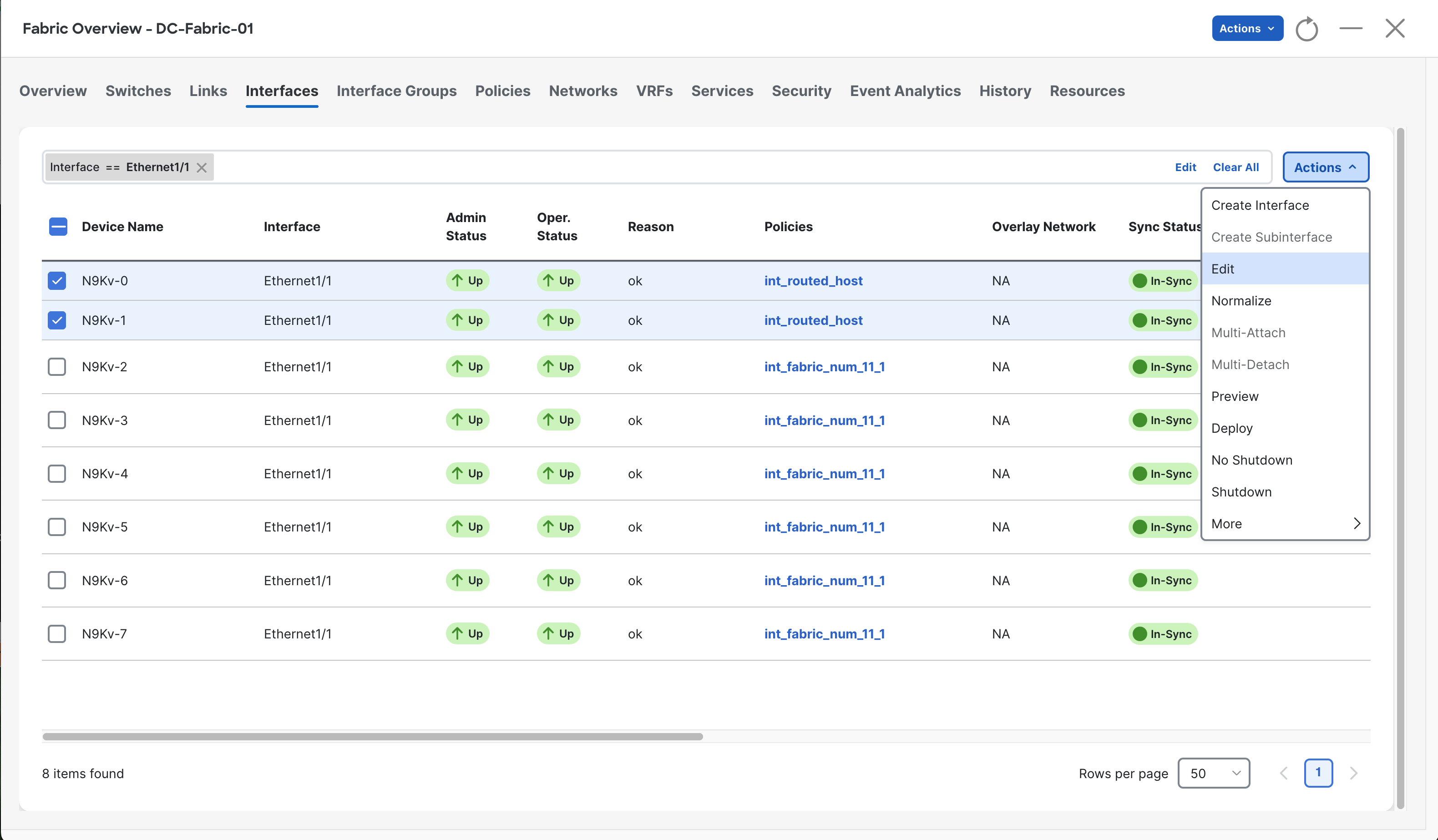
Navigate to the Interfaces tab, then select the two Border Leafs, then select Edit from the Actions drop-down.
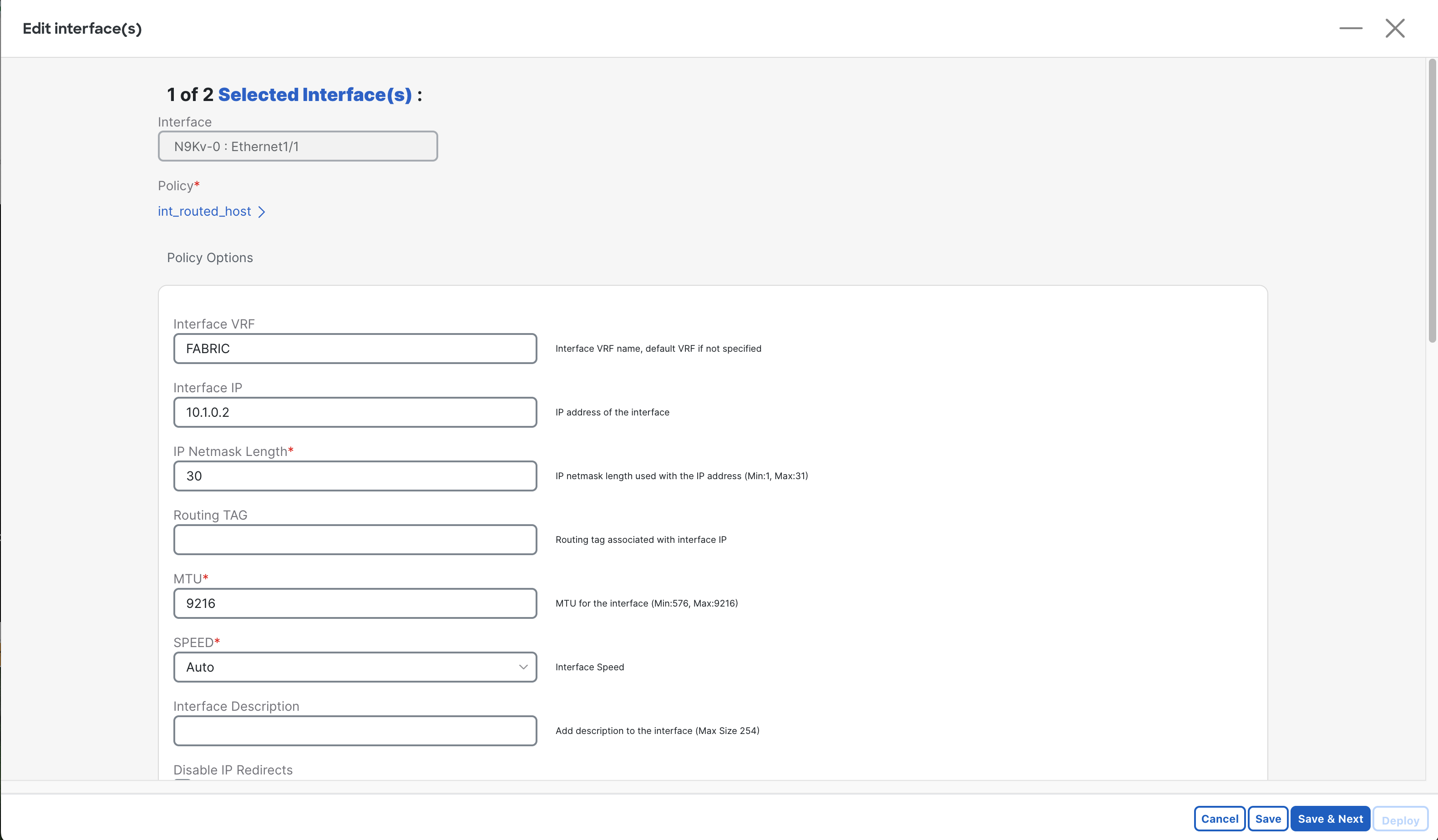
From this Edit screen, perform the following:
- Assign the interface to the “FABRIC” VRF (created in [[Basics of VXLAN EVPN in NDFC]])
- Enter an Interface IP which will be used for the source of the neighborship.
- Enter the subnet mask for the IP.
Repeat this step for the next interface as well, with the details changing for that link.
VRF Attachment
Section titled “VRF Attachment”As you may recall, the VRF “FABRIC” which is used for host networks in our fabric, will not have been pushed to the borders, as it does not need an NVI.
You can see this is an issue by searching for “Interface == Ethernet1/1” on the Interfaces tab.
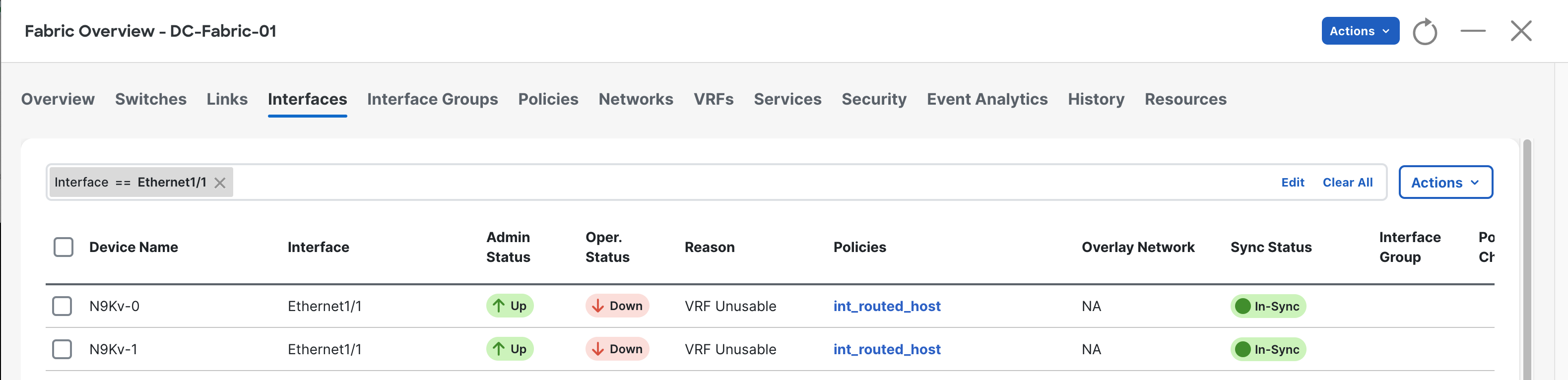
Here we can see that the interfaces are down due to “VRF Unusable”.
To solve this, navigate to the VRFs tab, then select FABRIC, then click Multi-Attach.
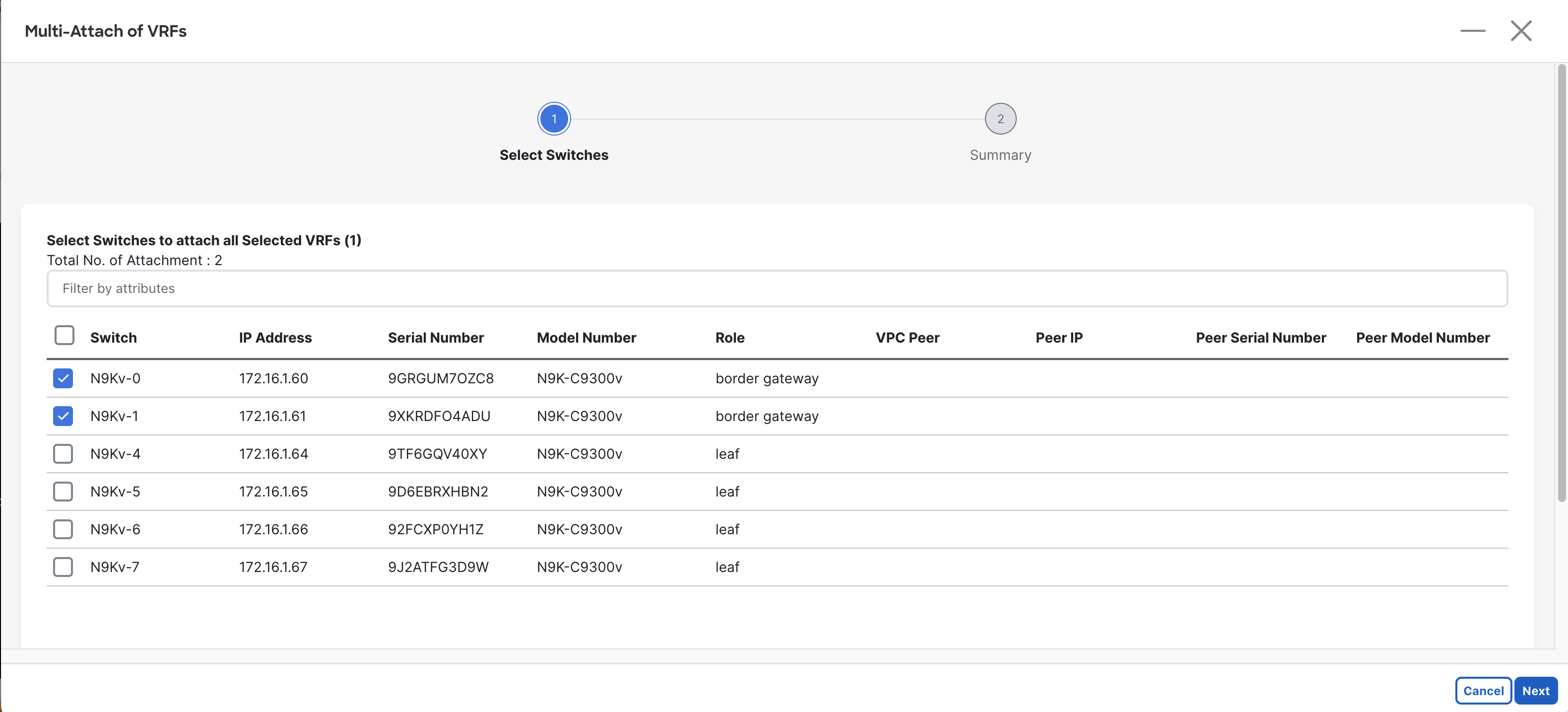
Select both Borders to have the VRF attached to, then select Next.
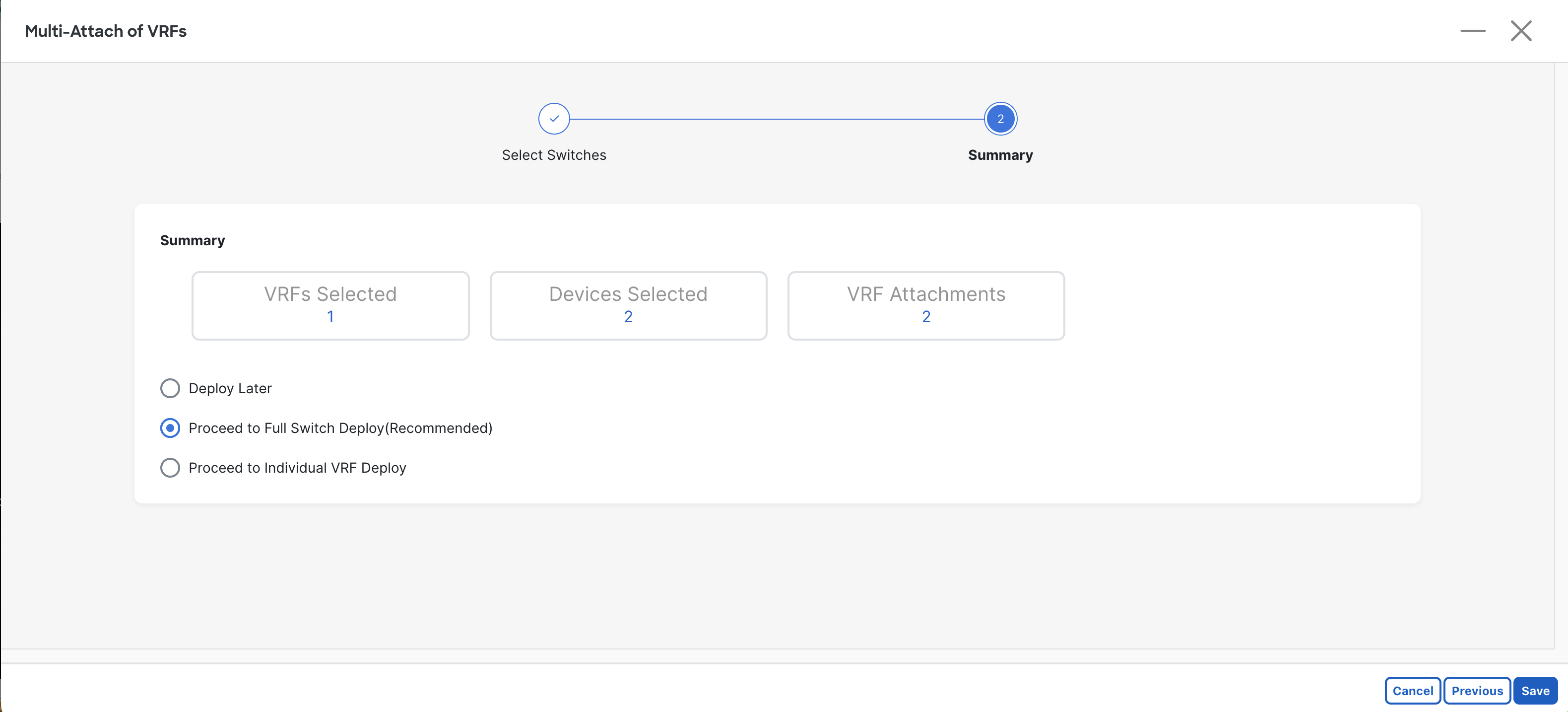
Keep the recommended option: “Proceed to Full Switch Deploy” then select Save.
Then select Deploy All to deploy the pending changes.
Verifications
If you want to test these configurations so far, log into the Catalyst 8000v, then perform the following:
C8000v-1# ping 10.1.0.2Type escape sequence to abort.Sending 5, 100-byte ICMP Echos to 10.1.0.2, timeout is 2 seconds:!!!!!Success rate is 100 percent (5/5), round-trip min/avg/max = 1/1/2 msIf you can ping the IP address on the N9K interfaces, then you are good to move on!
eBGP Policy
Section titled “eBGP Policy”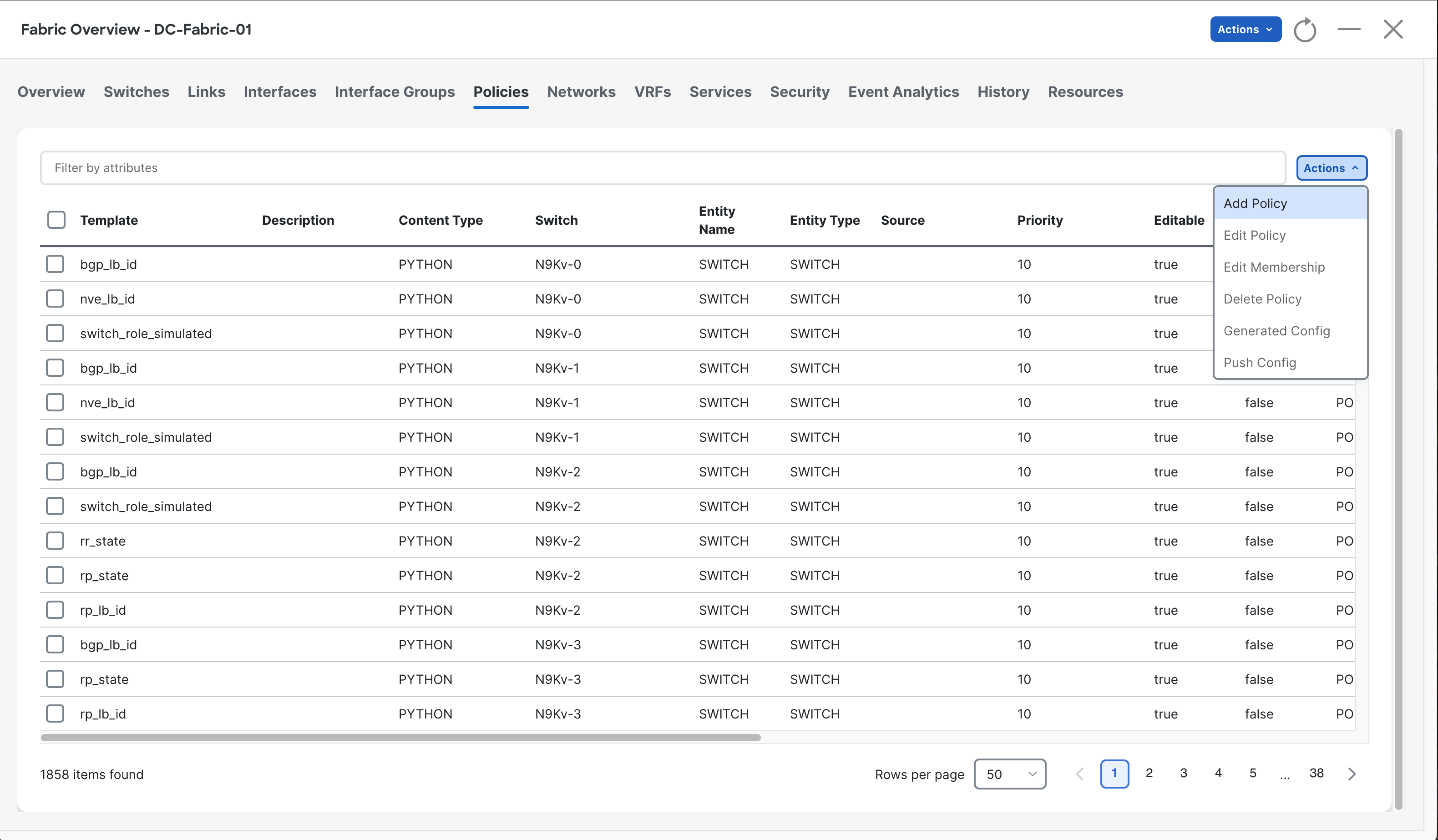
Navigate to the Policies tab, then select the Actions drop-down, then click Add Policy.
Then select the first Border Leaf switch.
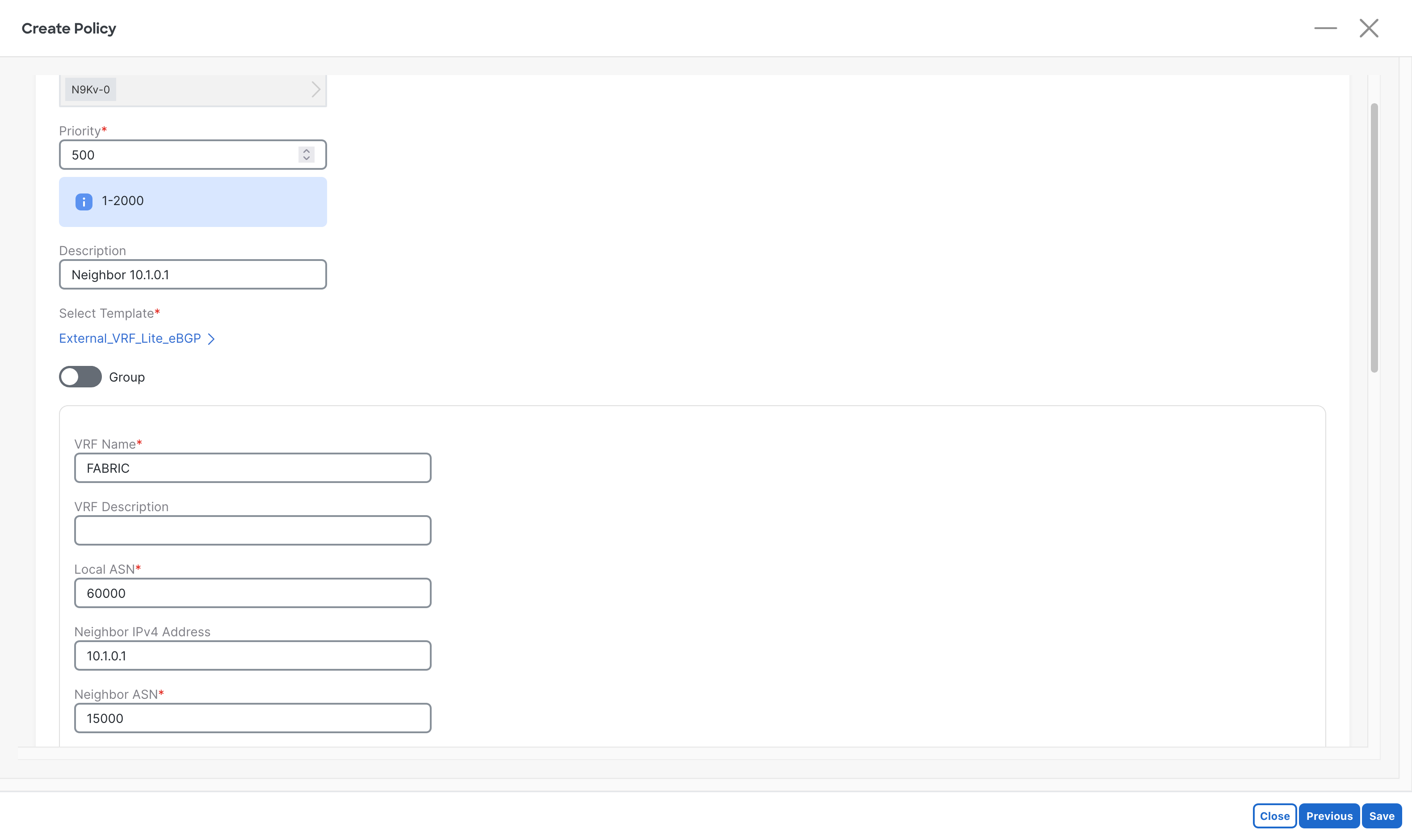
Enter the following information:
- Template: “External_VRF_Lite_eBGP”
- Local ASN The local devices AS number.
- VRF Name: Same name as used for VXLAN Fabrics
- Neighbor ASN: The AS of the remote system (c8000v)
- Neighbor IPv4 Address: The IP address of the connected link on the N9K.
When complete, select the Save button at the bottom right.
Repeat for the other Border Leaf, but change the info for that link.
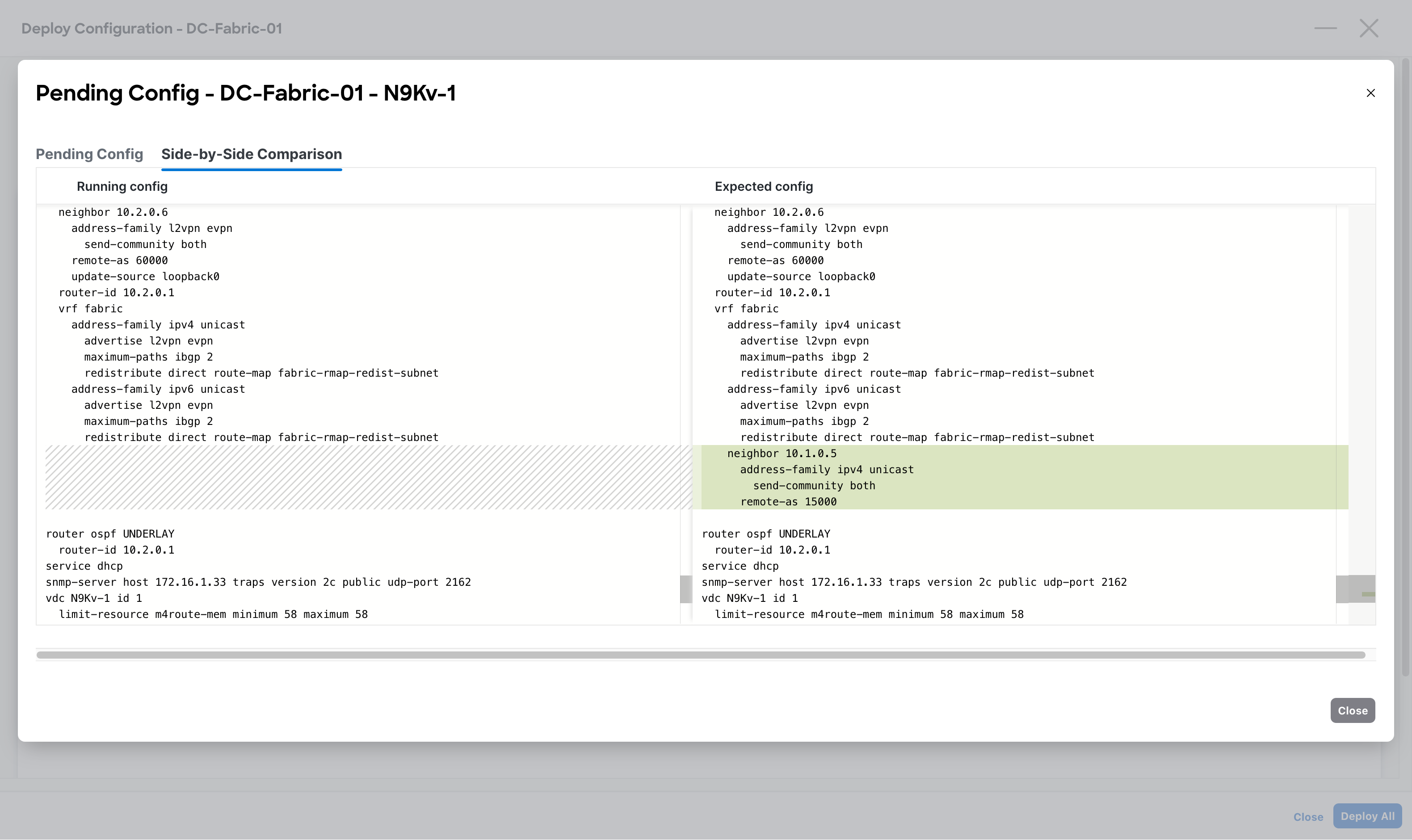
Once complete, Recalculate and Deploy to view the new configs. When the configs look as they should, deploy the changes.
Verifications
Section titled “Verifications”Now that we’ve configured the Routed Interfaces, attached the VRF, and setup the External BGP Policy, we can test if the routes are getting advertised as expected.
Log onto the Catalyst 8000v, then run show ip route bgp to view all the routes being learned via BGP.
C8000v-1# show ip route bgp
Gateway of last resort is 10.0.0.1 to network 0.0.0.0
      192.51.100.0/24 is variably subnetted, 2 subnets, 2 masksB        192.51.100.0/24 [20/0] via 10.1.0.6, 00:00:07B        192.51.100.10/32 [20/0] via 10.1.0.6, 00:00:07B     203.0.113.0/24 [20/0] via 10.1.0.6, 00:00:07
Here we can see that it is learning the routes!
Let’s now test with a host, specifically Host-1:
Host-1# ping 1.1.1.1Type escape sequence to abort.Sending 5, 100-byte ICMP Echos to 1.1.1.1, timeout is 2 seconds:!!!!!Success rate is 100 percent (5/5), round-trip min/avg/max = 4/6/17 msGreat, we can see that hosts connected to our fabric can ping externally.
Unfortunately, when trying to ping out to the internet (connected via the ISP router), we are not seeing reachability.
Host-1# ping 8.8.8.8Type escape sequence to abort.Sending 5, 100-byte ICMP Echos to 8.8.8.8, timeout is 2 seconds:.....Success rate is 0 percent (0/5)This behavior is due to the FABRIC VRF not having a default route configured.
Lets configure a default route, then have BGP propagate it through the network.
Static Default Route
Section titled “Static Default Route”Navigate to the Policies tab, then create a New Policy.
Select the “static_route_v4_v6” template.
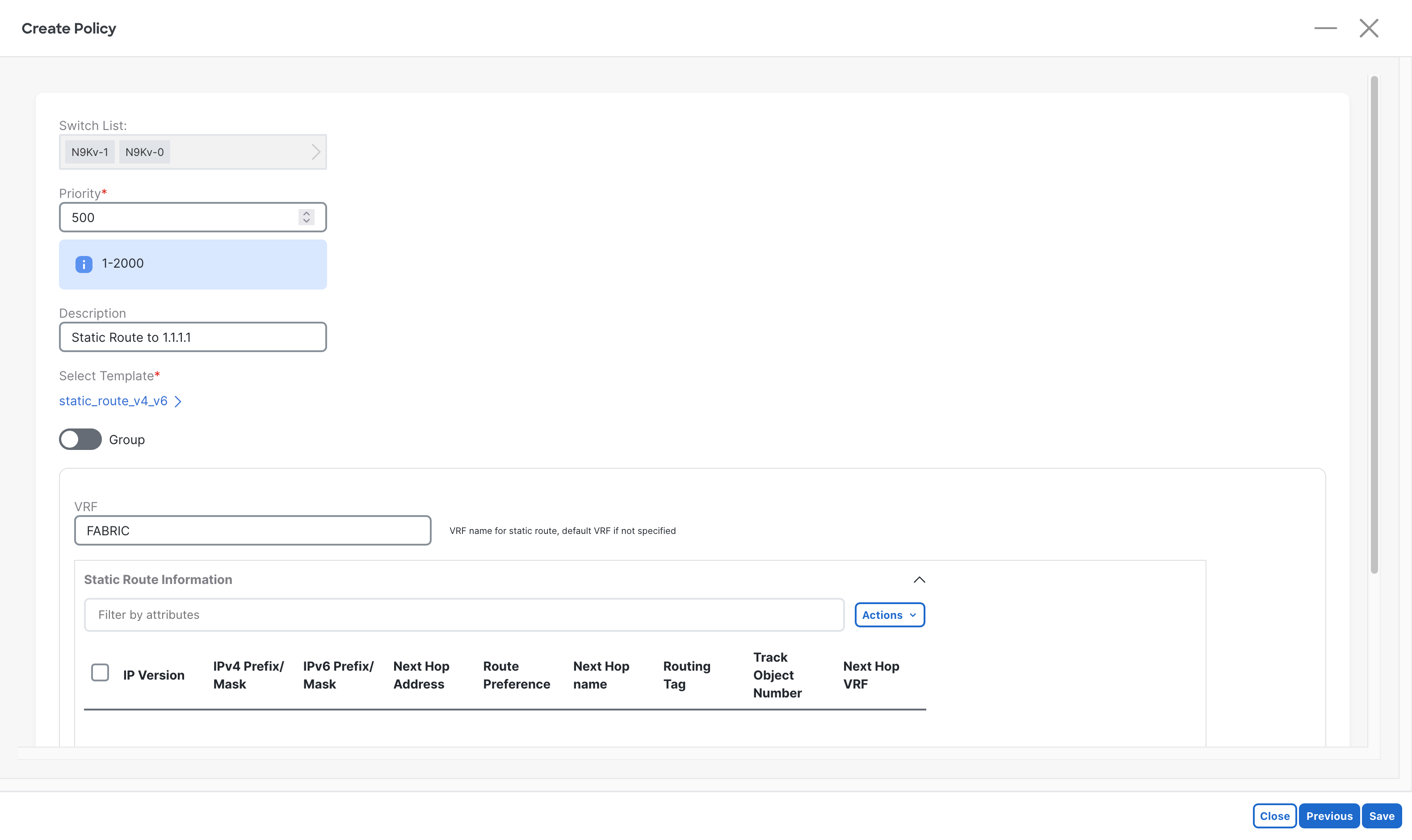
After entering a description, select Add from the Actions drop-down.
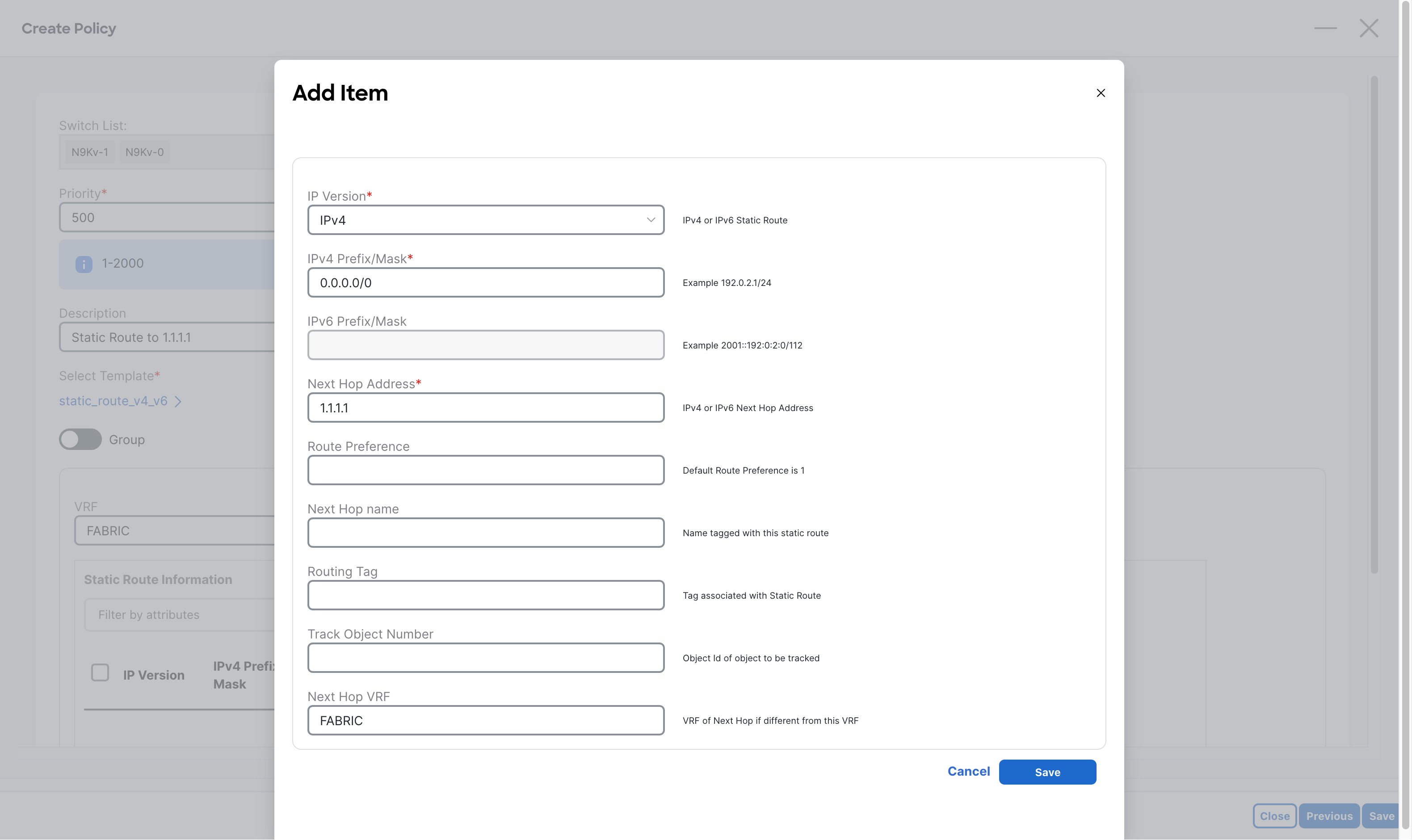
Enter in the following information, given the requirements:
- IP Version
- IPv4 Prefix/Mask
- Next Hop Address
- Next Hop VRF
Click the Save button at the bottom right.
Then select Save at the bottom right of the Policy screen.
Deploy the new configurations, and preview the changes:
vrf context fabric ip route 0.0.0.0/0 1.1.1.1Here we can see that the default route is going to be added as planned.
Verifications
Section titled “Verifications”Now to test this part of the configuration, log onto a Border lEaf and attempt to ping 8.8.8.8 from the FABRIC VRF.
N9Kv-0# ping 8.8.8.8 vrf FABRICPING 8.8.8.8 (8.8.8.8): 56 data bytes64 bytes from 8.8.8.8: icmp_seq=0 ttl=116 time=12.637 ms64 bytes from 8.8.8.8: icmp_seq=1 ttl=116 time=11.734 ms64 bytes from 8.8.8.8: icmp_seq=2 ttl=116 time=12.012 ms64 bytes from 8.8.8.8: icmp_seq=3 ttl=116 time=11.922 ms64 bytes from 8.8.8.8: icmp_seq=4 ttl=116 time=12.025 ms--- 8.8.8.8 ping statistics ---5 packets transmitted, 5 packets received, 0.00% packet lossround-trip min/avg/max = 11.734/12.066/12.637 ms
N9Kv-0# sh ip route 0.0.0.0 vrf FABRIC0.0.0.0/0, ubest/mbest: 1/0    *via 1.1.1.1, [1/0], 00:01:07, static
From the output above you can see that the Border Leafs can ping 8.8.8.8 when the ICMP packets are sourced from a local interface.
Though this will only work on the Border Leafs, since that policy was only for the Borders.
BGP Prefix Advertisement
Section titled “BGP Prefix Advertisement”Currently, the issue is that other devices in the fabric like the Leafs, do not have the default gateway route that the borders do. To solve this, we will use BGP to advertise the 0.0.0.0/0 network to all other switches.
Navigate to the Policy screen, then create a new policy with the “bgp_vrf_network” template for both Border Leafs.
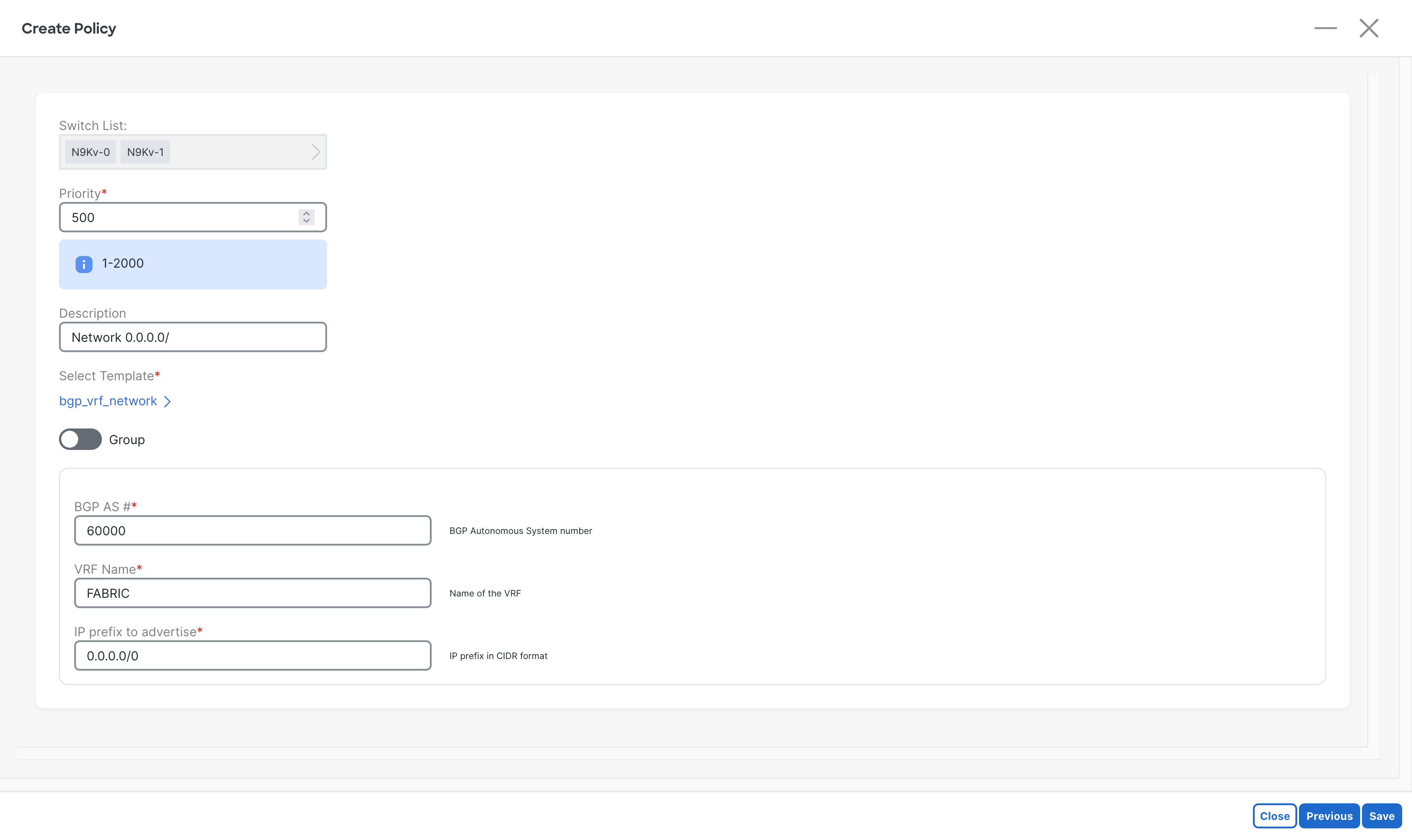
Enter the following information:
- BGP AS #
- VRF Name
- IP Prefix to Advertise
Once complete, Deploy the changes, and preview the changes:
router bgp 60000 vrf fabric address-family ipv4 unicast network 0.0.0.0/0Verifications
Section titled “Verifications”Now time to test, attempt to ping 8.8.8.8 from one of the fabric hosts.
Host-1# ping 8.8.8.8Type escape sequence to abort.Sending 5, 100-byte ICMP Echos to 8.8.8.8, timeout is 2 seconds:!!!!!Success rate is 100 percent (5/5), round-trip min/avg/max = 12/12/15 msGreat! We have achieved all goals of this guide.
But…
With this configuration, there is a potential issue, since our fabrics BGP is adverttizing 0.0.0.0/0, the Catalyst 8000v will get it too. This means that if the default route on it goes out, it will forward all traffic to itself!
To demonstrate this issue, view the following demo:
C8000v-1#show ip routeGateway of last resort is 10.0.0.1 to network 0.0.0.0S*    0.0.0.0/0 [1/0] via 10.0.0.1      1.0.0.0/32 is subnetted, 1 subnetsC        1.1.1.1 is directly connected, Loopback0      10.0.0.0/8 is variably subnetted, 6 subnets, 2 masksC        10.0.0.0/30 is directly connected, GigabitEthernet1L        10.0.0.2/32 is directly connected, GigabitEthernet1C        10.1.0.0/30 is directly connected, GigabitEthernet2L        10.1.0.1/32 is directly connected, GigabitEthernet2C        10.1.0.4/30 is directly connected, GigabitEthernet3L        10.1.0.5/32 is directly connected, GigabitEthernet3      192.51.100.0/24 is variably subnetted, 2 subnets, 2 masksB        192.51.100.0/24 [20/0] via 10.1.0.6, 00:30:32B        192.51.100.10/32 [20/0] via 10.1.0.6, 00:30:32B     203.0.113.0/24 [20/0] via 10.1.0.6, 00:30:32
C8000v-1#show run | section routerouter ospf 1 router-id 1.1.1.1 network 172.16.1.0 0.0.0.255 area 0router bgp 15000 bgp log-neighbor-changes neighbor 10.1.0.2 remote-as 60000 neighbor 10.1.0.6 remote-as 60000 ! address-family ipv4  network 1.1.1.1 mask 255.255.255.255  network 10.0.0.0 mask 255.255.255.252  neighbor 10.1.0.2 activate  neighbor 10.1.0.6 activate exit-address-familyip route 0.0.0.0 0.0.0.0 10.0.0.1
Above is the normal configuration, which works, but what if the static route gets taken away…
C8000v-1#configure terminalC8000v-1(config)#no ip route 0.0.0.0 0.0.0.0 10.0.0.1C8000v-1(config)#endC8000v-1#show ip routeGateway of last resort is 10.1.0.2 to network 0.0.0.0B* 0.0.0.0/0 [20/0] via 10.1.0.2, 00:00:04 1.0.0.0/32 is subnetted, 1 subnetsC 1.1.1.1 is directly connected, Loopback0 10.0.0.0/8 is variably subnetted, 6 subnets, 2 masksC 10.0.0.0/30 is directly connected, GigabitEthernet1L 10.0.0.2/32 is directly connected, GigabitEthernet1C 10.1.0.0/30 is directly connected, GigabitEthernet2L 10.1.0.1/32 is directly connected, GigabitEthernet2C 10.1.0.4/30 is directly connected, GigabitEthernet3L 10.1.0.5/32 is directly connected, GigabitEthernet3 192.51.100.0/24 is variably subnetted, 2 subnets, 2 masksB 192.51.100.0/24 [20/0] via 10.1.0.6, 00:30:51B 192.51.100.10/32 [20/0] via 10.1.0.6, 00:30:51B 203.0.113.0/24 [20/0] via 10.1.0.6, 00:30:51Here we can see that without the static route, BGP is taking over as the default route, causing traffic to black hole at the C8000v.
Let’s setup some policy to block the advertisement of this route to the C800v.
Route Filtering
Section titled “Route Filtering”The following steps get into some advanced routing, so the details will be brief.
Prefix List
Section titled “Prefix List”Create a new Policy for both Border Leafs.
Select the “ipv4_prefix_list” template.
Name the prefix list DENY_DEFAULT.
Add the following entires to block 0.0.0.0/0 but permit all other routes.
| Seq | Prefix | Action | Min Len | Max Len |
|---|---|---|---|---|
| 5 | 0.0.0.0/0 | deny | (blank) | (blank) |
| 10 | 0.0.0.0/1 | permit | 2 | 32 |
| 20 | 128.0.0.0/1 | permit | 2 | 32 |
| Click the Save button at the bottom right to save. |
Route Map
Section titled “Route Map”Create a new Policy for both Border Leafs.
Select the “route_map_match” template.
Name the route map block-default-out.
Enter the following information:
- Route Map Action:
permit - Route Map Sequence Number:
10 - ACL/Prefix-List Name:
DENY_DEFAULT - Match Route Using Prefix-List:
YES
Click the Save button at the bottom right to save.
Apply to BGP
Section titled “Apply to BGP”Create a new Policy for EACH OF the Border Leafs.
Select the “bgp_neighbor_route_map” template.
Enter the corresponding info for each Border Leaf:
- BGP AS:
60000 - VRF Name:
FABRIC - Route Map Name:
block-default-out - Route Map Direction:
out
Click the Save button at the bottom right to save.
Then when complete, deploy and preview the changes.
Verifications
Section titled “Verifications”As one last final test, lets confirm that the route 0.0.0.0/0 is NOT being advertised to the Catalyst 8000v…
C8000v-1# show ip routeGateway of last resort is not set 1.0.0.0/32 is subnetted, 1 subnetsC 1.1.1.1 is directly connected, Loopback0 10.0.0.0/8 is variably subnetted, 6 subnets, 2 masksC 10.0.0.0/30 is directly connected, GigabitEthernet1L 10.0.0.2/32 is directly connected, GigabitEthernet1C 10.1.0.0/30 is directly connected, GigabitEthernet2L 10.1.0.1/32 is directly connected, GigabitEthernet2C 10.1.0.4/30 is directly connected, GigabitEthernet3L 10.1.0.5/32 is directly connected, GigabitEthernet3 192.51.100.0/24 is variably subnetted, 2 subnets, 2 masksB 192.51.100.0/24 [20/0] via 10.1.0.2, 00:01:30B 192.51.100.10/32 [20/0] via 10.1.0.2, 00:01:30B 203.0.113.0/24 [20/0] via 10.1.0.2, 00:01:30Success! We are now seeing that BGP is no longer advertising the default route to the C8000v.
Now lets throw the normal static default route back on the Ctalayst 8000v, then do one last ping test…
Host-1# ping 8.8.8.8Type escape sequence to abort.Sending 5, 100-byte ICMP Echos to 8.8.8.8, timeout is 2 seconds:!!!!!Success rate is 100 percent (5/5), round-trip min/avg/max = 12/15/23 msAmazing, everything is working as expected.
This concludes the guide.