SPAN, RSPAN, & ERSPAN
SPAN (Switched Port Analyzer)
Section titled “SPAN (Switched Port Analyzer)”SPAN is a Cisco feature used for traffic mirroring. It copies Layer 2 packets from source interfaces or VLANs and forwards them to a destination port for analysis—commonly by a packet sniffer or analyzer tool.
SPAN is commonly used for:
- Troubleshooting network issues
- Packet capture for security analysis
- Application or performance monitoring
There are two types of SPAN:
- Local SPAN – source and destination are on the same switch
- Remote SPAN (RSPAN) – source and destination can be on different switches, using a special RSPAN VLAN
Local SPAN
Section titled “Local SPAN”Local SPAN mirrors traffic within the same device (or stack).
Configuration
Section titled “Configuration”Define the source interface or VLAN, and then specify the destination interface:
monitor session 1 source interface GigabitEthernet1/0/1 [both | rx | tx]monitor session 1 source vlan 10monitor session 1 destination interface GigabitEthernet1/0/10Remote SPAN (RSPAN)
Section titled “Remote SPAN (RSPAN)”RSPAN allows traffic from a source port or VLAN on one switch to be mirrored to a destination port on another switch using a remote-span VLAN.
Configurations
Section titled “Configurations”Step 1: Configure the RSPAN VLAN
Section titled “Step 1: Configure the RSPAN VLAN”All switches along the path must be aware of this VLAN and mark it as a remote-span.
vlan 100 remote-spanStep 2: Configure the Source Session
Section titled “Step 2: Configure the Source Session”monitor session 1 source interface GigabitEthernet1/0/1monitor session 1 destination remote vlan 100This mirrors traffic to the remote-span VLAN.
Step 3: Configure the Destination Session
Section titled “Step 3: Configure the Destination Session”On the remote switch where the destination port exists:
monitor session 2 source remote vlan 100monitor session 2 destination interface GigabitEthernet1/0/24SPAN Additional Configs
Section titled “SPAN Additional Configs”VLAN Filtering (SPAN Source Filter)
Section titled “VLAN Filtering (SPAN Source Filter)”Use this to limit traffic mirrored from a trunk port or VLAN source:
monitor session 1 filter vlan 10Only traffic in VLAN 10 is mirrored.
IP/MAC/IPv6 Filtering (FSPAN/FRSPAN)
Section titled “IP/MAC/IPv6 Filtering (FSPAN/FRSPAN)”Used for fine-grained traffic selection:
monitor session 1 filter ip access-group 101The access-list can match specific source/destination IPs or MACs.
Destination Encapsulation
Section titled “Destination Encapsulation”The destination interface can replicate the encapsulation of the source:
monitor session 1 destination interface GigabitEthernet1/0/10 encapsulation replicate- Mirrored packets retain their 802.1Q tags.
- Your analyzer sees whether a packet came from VLAN 10 or 20.
Or configure how inbound (ingress) packets are handled:
monitor session 1 destination interface GigabitEthernet1/0/10 ingress vlan 6monitor session 1 destination interface GigabitEthernet1/0/10 ingress dot1q vlan 6| Command Variant | Accepts Tagged? | Accepts Untagged? | Untagged VLAN Assignment |
|---|---|---|---|
ingress dot1q vlan 6 | Yes | Yes | 6 |
ingress vlan 6 untagged vlan 6 | No | Yes | 6 |
Encapsulated Remote SPAN (ERSPAN)
Section titled “Encapsulated Remote SPAN (ERSPAN)”ERSPAN extends RSPAN by encapsulating mirrored traffic in GRE packets and sending it across Layer 3 networks. This allows packet monitoring across IP networks, not just within L2 broadcast domains.
Unlike SPAN or RSPAN, ERSPAN requires a source IP, destination IP, and ERSPAN session ID.
Use Cases
Section titled “Use Cases”- Monitor traffic from branch routers to a centralized data center.
- Capture traffic from remote devices across routed paths.
- Integrate with cloud-based or virtualized traffic analyzers.
Configuration on IOS-XE
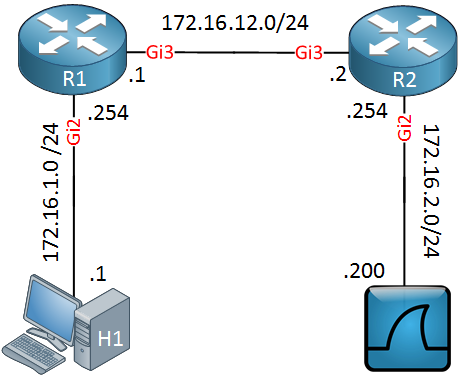
Section titled “Configuration on IOS-XE”The source router must have a route to the
ip addressaka the collector.
Guide from Network Lessons.
Define the Source Session
Section titled “Define the Source Session”! R1monitor session 1 type erspan-source no shutdown source interface GigabitEthernet 2 destination erspan-id 100 ip address 172.16.12.2 origin ip address 172.16.12.1source interface: Interface you want to mirror.erspan-id: Unique identifier for the ERSPAN session.ip address: IP of the ERSPAN destination (collector, eg. Wireshark host).origin ip: exit IP of the ERSPAN source (this device).
The router will encapsulate mirrored packets in GRE with ERSPAN headers and send them to the collector.
Define the Destination Session
Section titled “Define the Destination Session”! R2monitor session 1 type erspan-destination no shutdown destination interface GigabitEthernet 2 source erspan-id 100 ip address 172.16.12.2The IP address entered must be matching the IP configured in the source session, pointing to the Wireshark or collector host.
Verification
Section titled “Verification”show monitor session 1